windows-native · pre-order · lifetime licence

Every coding agent.
One guild hall.
On Windows.

Every agent CLI you already pay for, live on one infinite canvas as a real terminal — summoned by voice, able to talk to each other, and able to recruit workers of their own.

one-time · lifetime licence · no subscription
Pre-order — Get the pre-order link by email

Checkout isn't open yet. We haven't finished setting up the payment side, and we would rather say that than hand you a button that quietly goes nowhere. Nothing on this page can take your money today. Leave your email and we'll send you the link the day it opens.

Not shipped yet. This is a pre-order — a lifetime licence now, access when the beta opens, refundable in full until then.
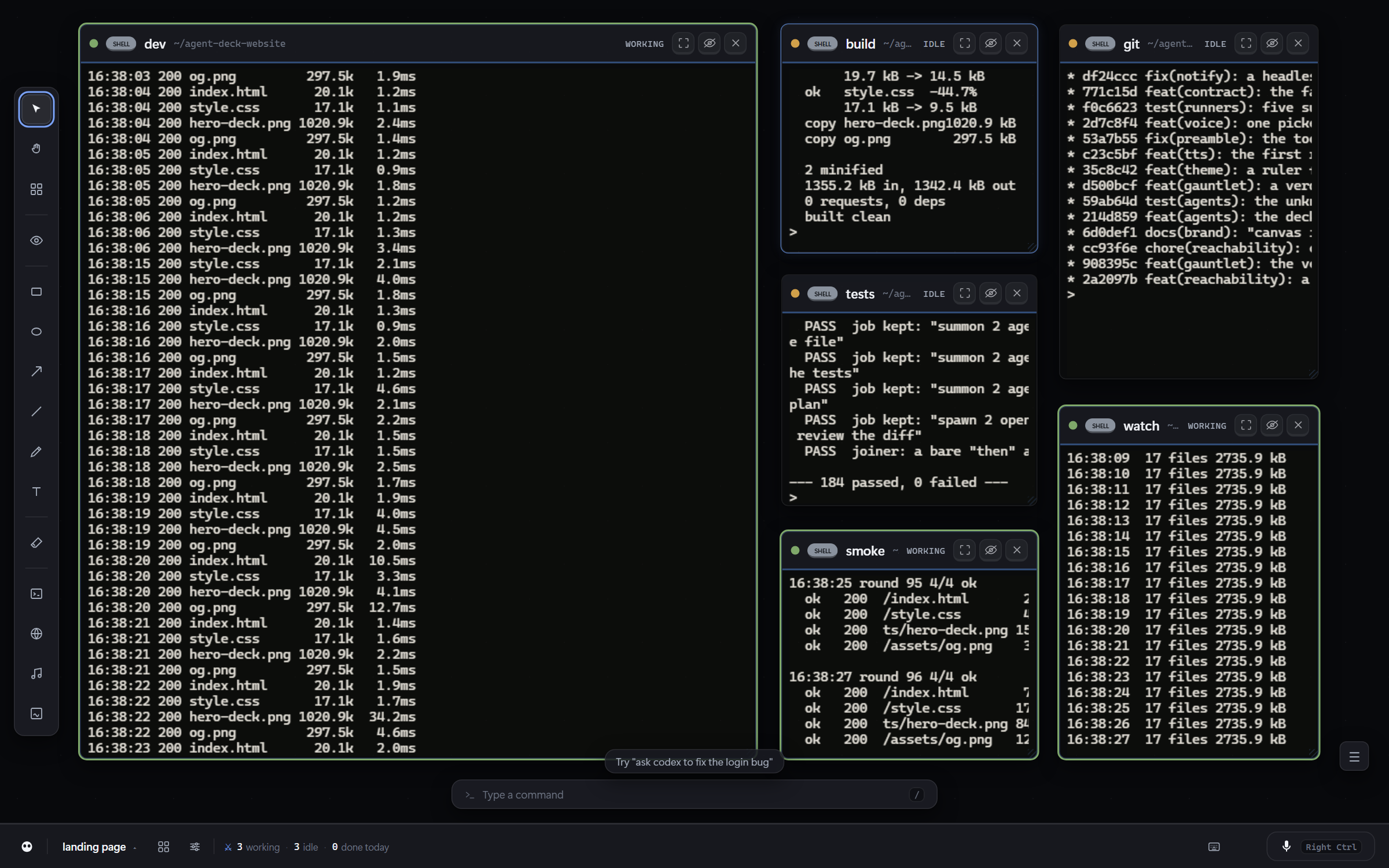
The Agent Deck canvas: several live terminal sessions arranged as draggable nodes on one dark infinite canvas, each with its own title bar and status.
A real deck, mid-session on Windows 11 — a screenshot of the running app, not a mock-up.

Why this exists

The good version of this is Mac-only. This one isn't.

Voice-controlled agent cockpits exist — they're native Swift apps built for macOS. If you build on Windows, that category has had nothing. AGENT DECK is the same idea, built for the machine you actually have: a local Windows app, bought once, that drives the agent CLIs you already pay for. We never sit between you and your agents, and we never see your code.

A guild hall rather than a chat window, and the difference is the point. Every agent you summon can see the canvas, read what the others are doing, message them, and spawn workers of its own. Ask one agent for five and it recruits them, briefs them, watches them and comes back with a single answer — an agent here is a clan leader, not a text box.

What it does

Any harness, one canvas

Claude Code, Codex, Gemini, OpenCode, Kimi, Qwen, Grok — pull up any of them as a node on the same canvas, in the same project, at the same time. Multi-CLI is the product, not a config option.

Agents recruit their own clan

Every agent is handed the tooling to see the hall on the way in. It can check on the others, hand one of them a message, or spawn a fleet of workers and supervise them — so one instruction to one agent can turn into five agents working and one summary back.

Push-to-talk into any agent

Hold the mic, speak a command, and it's typed into whichever agent you're pointed at. It can run with no API key at all — speech recognition works entirely on your CPU with an optional model download, and the deck answers in a local neural voice with eleven speakers, fully offline. A free cloud key is the faster setup, not a requirement.

A real terminal grid

Every summoned agent is a real ConPTY session with full scrollback — not a chat log pretending to be a terminal. Click in and type anytime.

Live preview detection

Spin up a dev server in any session and the deck notices the localhost URL and gives you a one-click preview pane, right next to the terminal.

Task dispatcher

Queue a task, optionally pin it to an agent type, and the deck hands it to the next idle session automatically — no babysitting four terminals by hand.

claude code opencode kimi qwen grok codex gemini shell

Claude Code and opencode are the two we build against every day. Kimi, Qwen and Grok are the same binary with a model pinned. Codex and Gemini are wired up and off by default, for a reason we've written out below rather than buried.

How it works

01

Summon

Pick an agent, pick a project folder, optionally give it a kickoff task. It boots in a real ConPTY session inside the hall.

02

Command

Point voice at any session and hold the mic — or type directly into the terminal like you always have. Both work at once.

03

Supervise

Queue tasks to the dispatcher and let idle agents pick them up, or ask one agent to run the others and report back. Status dots tell you who's working.

What you bring

The deck drives your agents. It doesn't include them.

This is the part most tools are vague about, so here it is plainly. Agent Deck is a cockpit: it runs the agent CLIs you install, signed in to your accounts. That's why nothing is proxied through us and why there's no subscription — but it does mean a fresh install with no agent CLI installed can open a terminal and not much else.

Windows 10 or 11

64-bit. There is no Mac or Linux build, and there isn't going to be one soon.

Your own agent CLI

Claude Code and opencode are what we build against every day and what we'd recommend. Both need your own account — an existing Claude subscription, or your own provider key.

For voice: nothing you have to buy

Speech recognition can run entirely on your CPU with a one-time model download of about a gigabyte, and the deck talks back with a local neural voice — eleven speakers, fully offline. A free cloud key is the faster option to set up, about a minute, and it's optional. Said plainly, because it's the part worth knowing: if you use the cloud key, your audio goes to that provider — it's faster, and that's the trade. With no key it never leaves your machine, and there's a setting that pins it local for good even if a key is present.

Node.js, for installing agents

Not for the deck — it brings its own. The agent CLIs install through npm, so you'll want Node on your PATH.

Kimi, Qwen and Grok appear in the roster and are one binary — opencode with a model pinned — so there's nothing extra to install. They do need your own OpenCode Zen account with credit for that model; our development authentication doesn't travel with the installer, so they aren't free for you. Gemini CLI and Codex are wired up and off by default: the plumbing is the same plumbing the others use, but neither is authenticated on our machine, so we won't claim we've proven them end to end. Beta buyers turning those on and telling us what happened is genuinely one of the things we want out of this round.

Pre-order

, once. Lifetime licence.

one-time · lifetime licence · no subscription

The first 10 licences are . After that it's .

  • now Your licence key, emailed to you by hand — usually within a few hours, by a person, not a robot.
  • now A seat in the first beta round. We're taking 5–10.
  • later The Windows installer, when beta access opens.
  • later Every update after that, for as long as it exists.
Back to the pre-order ↑

Full refund any time before access opens — reply to your receipt and that's the whole process. No activation, no seat check, no phone-home: once you have the app it keeps working offline, whatever happens to us.

What you are buying today, said plainly

You will not be able to download anything today. This is a pre-order: you're paying now, in exchange for a lifetime licence at a price that won't be here later. We are not putting a date on this page — you'll get the access window by email, from us, when it's real rather than when it's convenient, and until it opens your money is refundable in one reply. The app is real and we use it to build itself every day — but it hasn't been installed by a stranger yet, and you'd be among the first. If that's not a trade you want, take the notify link below instead and pay when it ships. We'd rather have that than a refund.

Not ready to commit to something you can't run yet? Fair. Leave your email and we'll tell you the day it opens.